Teams in Breezaro, collaboration, roles and activity oversight
Teams let you invite colleagues to one account, split roles and keep an overview of what's happening (who changed what, and which operators are online and in which chat). Available from the Standard plan.
What plan are Teams available on?
Teams (multiple members on a single account) are included from the Standard plan up, and you can try them in the 30-day free trial:
- Basic: account owner only (no extra members)
- Standard: owner + 1 member
- Pro: owner + 5 members
- Business: owner + 10 members
Check the current seat counts on the pricing page.
Roles: who can do what
| Role | What they can do |
|---|---|
| Owner | Full control including billing: manage members, bots and delete the team |
| Editor | Co-admin: everything the owner can, except billing and account ownership |
| Operator | Live conversation takeover, own identity (name + avatar), read-only bot settings |
What Teams solve
Without teams, only one person can access the account. With teams you can:
- split the work: operators handle live conversations, editors manage content and settings,
- delegate without sharing a password, everyone has their own login and role,
- put several operators on live chat at once, so that each conversation is held by exactly one operator and you never step on each other.
Team activity: see what's happening
The owner and editors get an Activity section in the team detail with an at-a-glance overview:
- Change log (audit log). Who invited whom, who changed a role, who edited bot settings, added or removed a bot, renamed the team or deleted a conversation. Every event shows who did it and when, and the list updates in real time.
- Live operator presence. Which members are online right now and which conversation each one is handling. You can see at a glance who is working and where.
- Releasing a conversation. An owner or editor can release a conversation from an operator (force-release); it then returns to the AI or can be picked up by someone else.
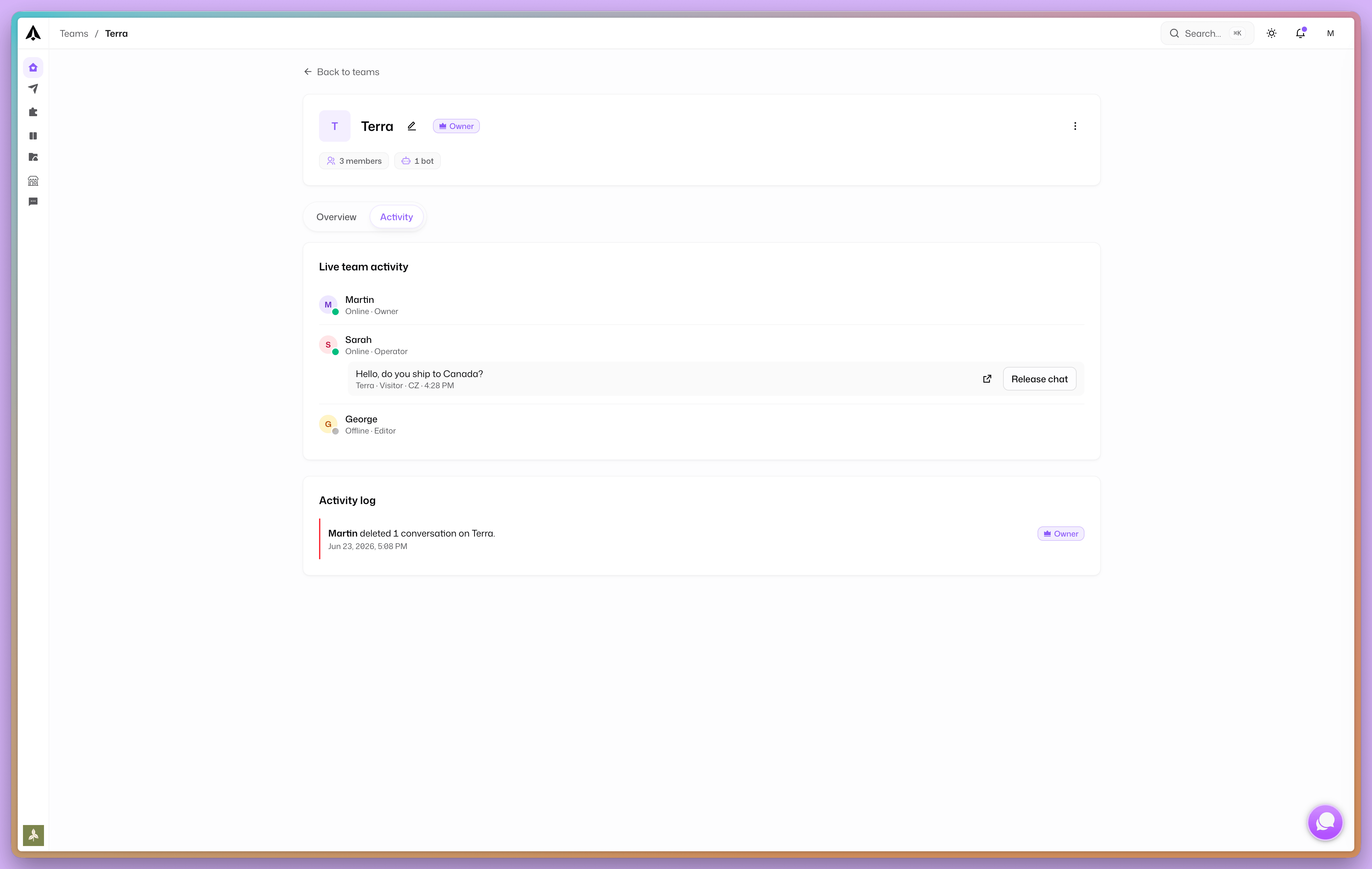
Live conversation takeover (and therefore "who is in which chat") relates to live chat, which is available from the Pro plan and during the free trial. The change log is visible as soon as you have a team (from Standard).
Getting started
- Create a team in the dashboard (you need a plan with at least one extra seat).
- Invite a colleague by email and assign a role (Editor or Operator). The invite is valid for 7 days.
- Once they accept, the member appears in the team and the Activity section shows their actions and when they are online.
Teams turn Breezaro from a single-person tool into a shared workspace where you keep an overview and control of what happens with your bot and your conversations.
Related: AI chatbots for customer support (the complete guide).