Scenarios: decide yourself when the assistant speaks first
The assistant can start the conversation on its own. Either let Breezaro pick the moment, or write your own rules based on the page, time spent, browsing depth and return visits. Guardrails keep it from getting pushy, and the message is your own text for free or written by the AI for one credit.
Most visitors never ask. They read the pricing page, hesitate for a moment and leave without ever clicking the chat bubble. Scenarios turn that around: the assistant speaks first, but only when it makes sense, and by rules you set.
You will find them in the dashboard under Scenarios.
Two modes, one decision
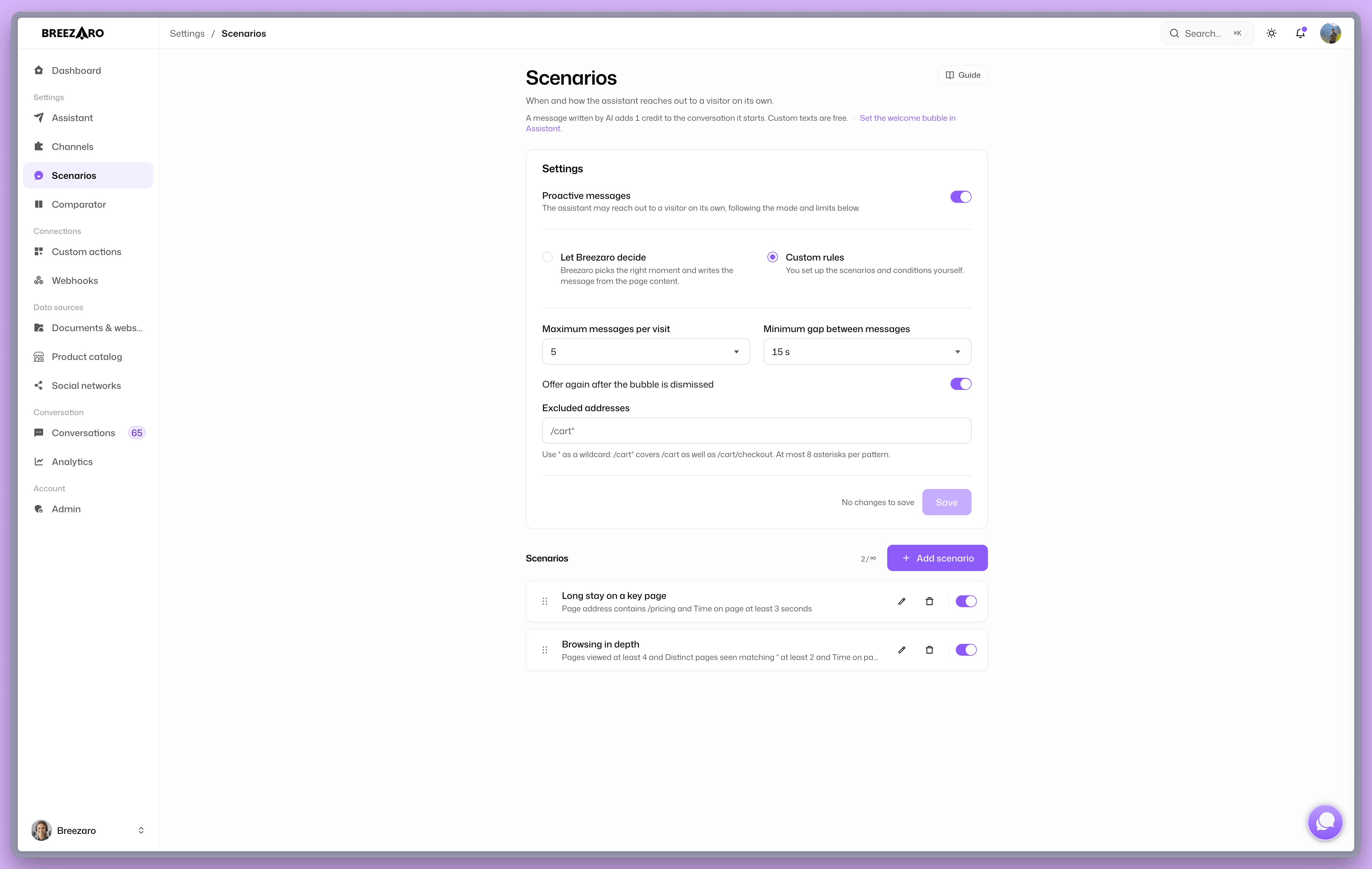
At the top of the page you choose who decides the right moment.
Let Breezaro decide. The assistant picks the moment itself and writes the message from the content of the page the visitor is on. Nothing to configure, just turn on Reach out to visitors at the top.
Custom rules. You compose the scenarios yourself. Each scenario is a set of conditions that must hold at the same time, plus the message to show. Scenarios are evaluated top to bottom and the first match wins, so order matters. Drag to change it.
What a scenario is made of
There are five conditions, and each carries its own hint in the editor so you do not have to memorise them.
- Page address. Where the visitor is right now. "Equals" compares the whole address, "Contains" looks for a fragment, "Matches pattern" accepts a wildcard:
/pricing*covers/pricingas well as/pricing/teams. - Time on page. How many seconds they have spent on this one page, counted from the moment it opened. The most common second condition, because on its own it separates skimming from interest.
- Pages viewed. How many pages they have opened during this visit, the current one included.
- First view this visit. Tells a first look apart from a return. Set it to "No" and the scenario is built precisely on the visitor coming back.
- Distinct pages seen. How many different pages matching a pattern they have already viewed. Write a path with a wildcard and pick the count:
/product/*with a count of 3 means they looked at at least three different products. A lone wildcard means any page.
Below the conditions a sentence assembles itself describing the scenario in plain language, for example Shows when Page address contains /pricing and Time on page at least 20 seconds. If the sentence reads wrong, so does the scenario.
The last two conditions work with browsing history, which you enable under Visitor context. Without it a scenario using them will not fire, and the editor says so.
The message: yours, or the AI's
For each scenario you choose what gets shown.
Custom text you write yourself, in every language the bot speaks. It is free, nothing is charged for it.
Written by AI generates an opener from the page content. It costs one credit, charged only when the bubble turns into a conversation, not per impression. You also pick what it should write about: the current page, the last page the visitor viewed, or the whole set of pages they compared, which is useful when you want to pick up on the products they were weighing against each other.
The AI also knows the situation it is writing for. A scenario built on a return visit tells it the visitor is coming back; a scenario about the last page viewed tells it to refer back rather than describe the page as the one being read. The opener then stops sounding like a first-look greeting.
Keeping it from getting pushy
Guardrails apply to both modes and are set once for the whole site.
- Max messages per visit. How many times the bubble may appear at all during one visit.
- Minimum gap between messages. The pause between two approaches.
- Offer again after the bubble is dismissed. Whether we may approach a visitor who has closed the bubble.
- Excluded addresses. Pages where an approach is inappropriate. Typically the cart and checkout:
/cart/*,/checkout*.
Try it without waiting
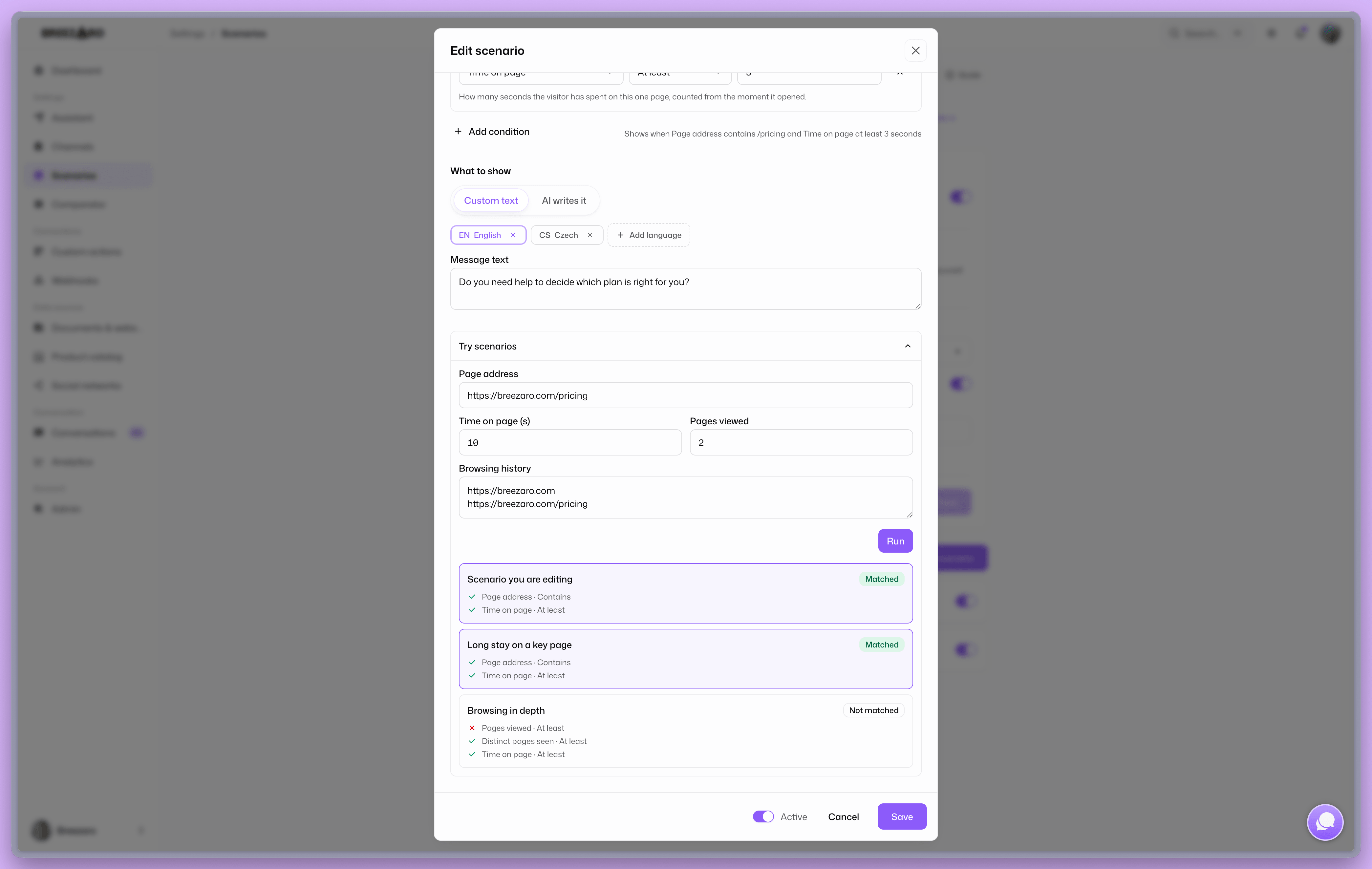
The editor has a Try scenarios panel. Enter an address, time on page, page count and optionally the paths the visitor has been through, and you immediately see which scenario would fire and which specific condition fails on the others. It works on an unsaved draft too.
Five templates to start from
When you add a scenario we offer five ready-made ones you only need to adjust:
- Undecided in a category. Looked at several pages in the same category and picked nothing.
- Long time on a key page. Spending a while on a page you nominate, such as pricing.
- Return to the same page. Viewing the same page again within one visit.
- Browsing in depth. Went through several pages during the visit.
- Comparing several pages. Viewed several pages matching a pattern you set. You write the opener, or hand it to the assistant to write about the set rather than one page.
Or start blank and compose the conditions yourself.
FAQ
Is every bubble charged? No. Custom text is always free. An AI-written message costs one credit, and only once it turns into a conversation.
What if two scenarios match at once? The one higher in the list wins. Change the order by dragging.
Will someone who has already chatted see the bubble? While the chat window is open or an unread reply is waiting, the assistant stays quiet. Otherwise your guardrails decide.
Do I have to enable browsing history for this? Only for two conditions, "First view this visit" and "Distinct pages seen". Every other scenario works without it.
Details on each option are in the scenarios documentation. If you are not using Breezaro yet, scenarios are part of the trial too.