How to connect Messenger and Instagram DMs to your AI chatbot (2026)
Your Breezaro assistant now answers in Facebook Messenger and Instagram direct messages, alongside WhatsApp, so all three Meta channels connect. It replies from the same knowledge base as your website chat, a human can take over, and it is included from the Standard plan and the trial. Here is what it does and how to connect each one, with no code.
Your customers already message you on Facebook and Instagram. Breezaro now puts your AI chatbot there too: it answers in Facebook Messenger and Instagram direct messages, in addition to WhatsApp, so all three Meta channels are connected from one dashboard. Replies come from the same knowledge base as your website widget, a person can step in at any time, and it is included from the Standard plan and during the trial. Here is what it does and how to connect it.
Your assistant, now in Messenger and Instagram DMs
Connect a Facebook Page or a professional Instagram account and the same bot that answers on your website starts answering there too:
- Answers from your content. The bot uses your knowledge base (website, documents, product catalog), so its Messenger and Instagram replies are as accurate as the ones in your widget.
- Multilingual. It replies in the customer's language automatically.
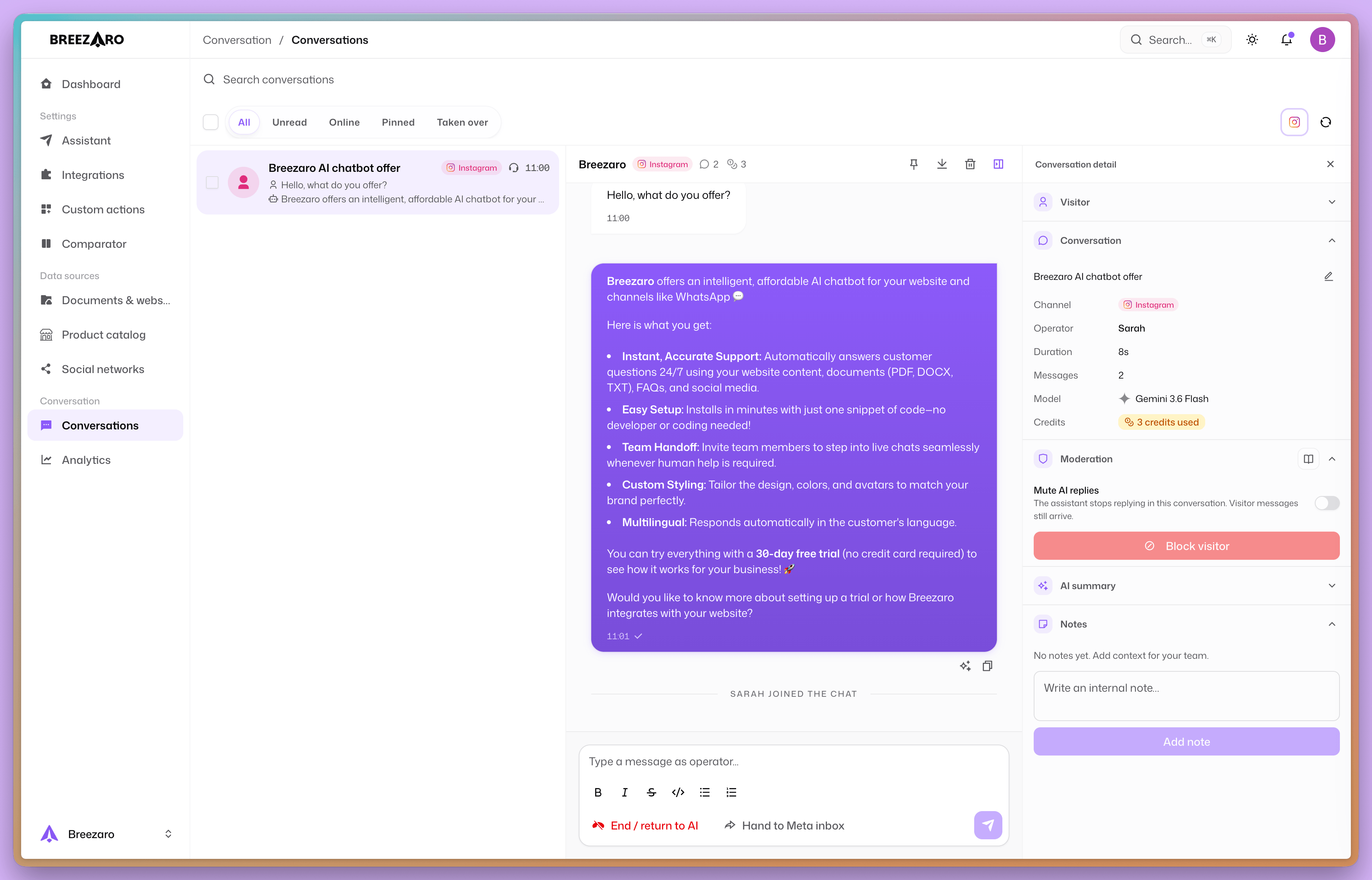
- Human takeover. An operator can take over any conversation with Take Control, the same way as on the web. The bot steps back while a person is handling it, and picks up again when they are done.
- One inbox. Messenger and Instagram chats land in the same conversation history as your web and WhatsApp chats, with web push for new messages.
- It knows when to step aside. As soon as a teammate replies from the Meta inbox (the Facebook or Instagram app), the bot backs off automatically and resumes when the human is finished.
Included from the Standard plan
Messenger and Instagram DMs are included from the Standard plan, and during the 30-day trial, the same as WhatsApp. There is no per-channel surcharge and no separate AI add-on. A bot reply on Messenger or Instagram is billed exactly like a reply in your web widget, by the model's credit cost plus any tools it uses.
On Meta's side, replying to inbound messages is free: when a customer messages you first, you are inside a standard messaging window during which Meta does not charge for your replies. You are not paying extra to answer the questions people send you.
How to connect Messenger
Setup runs through Meta's official sign-in, with no code:
- In the dashboard, open Integrations and choose Messenger.
- Sign in with Facebook and grant access to the Facebook Page you want to connect. You need to be an admin of that Page.
- Confirm, and the bot starts answering in that Page's Messenger.
A couple of things to check first: you must be an admin of the Page, and the Page must not have age or country restrictions turned on, otherwise Meta blocks message delivery. The full steps are in the Messenger integration guide.
How to connect Instagram DMs
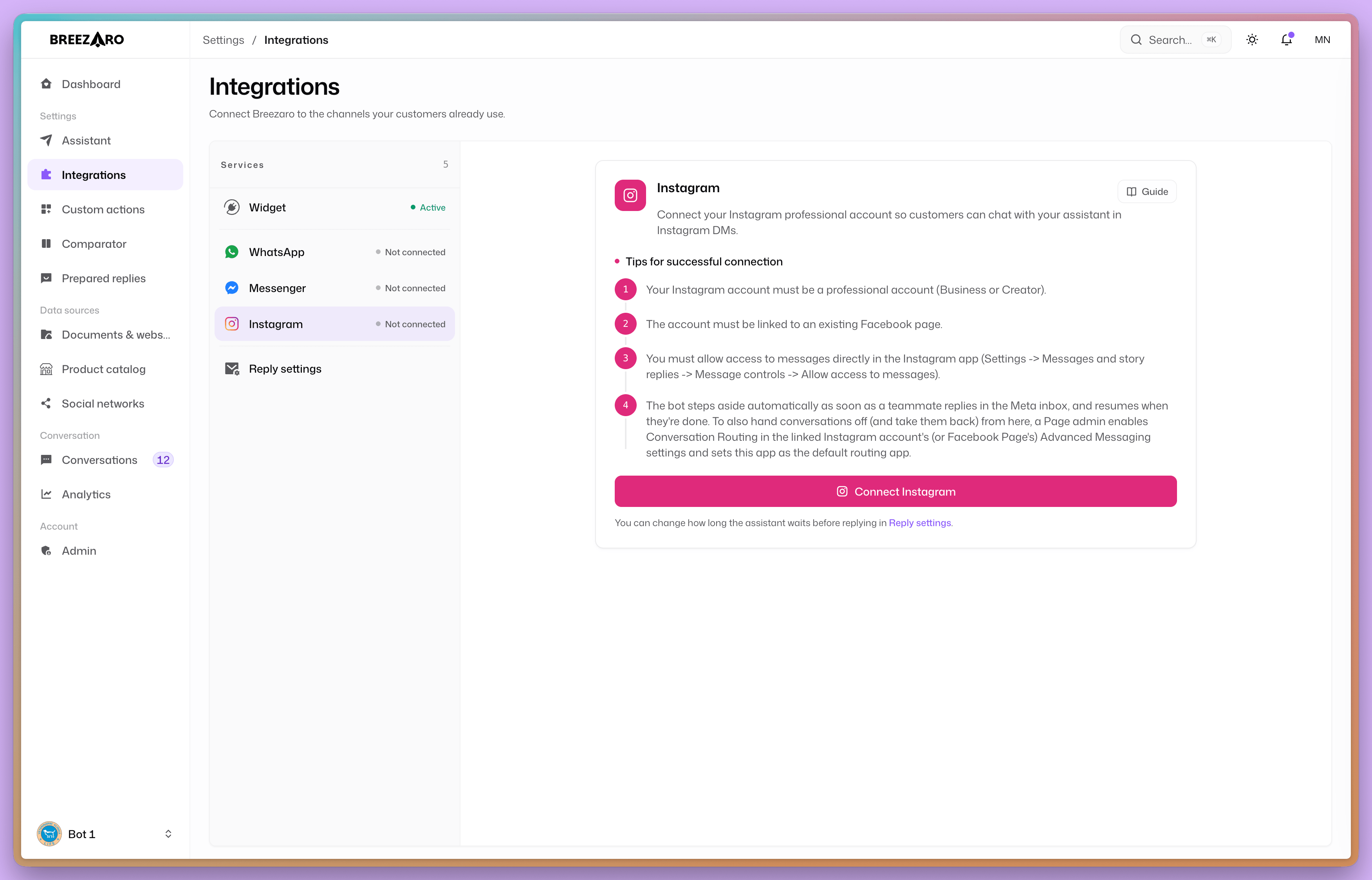
- In the dashboard, open Integrations and choose Instagram.
- Sign in and grant access to your professional Instagram account (Business or Creator).
- Confirm, and the bot starts answering your Instagram direct messages.
Before you start, make sure your Instagram account is a professional account linked to a Facebook Page, and that message access is allowed in the Instagram app (Settings, then Messages and story replies, then Message controls, then Allow access to messages). The full steps are in the Instagram DM guide.
Handing conversations back and forth
The bot and your team share one thread. If you or a colleague reply from the Meta inbox (the Facebook Page inbox or the Instagram app), the bot notices and steps aside, then resumes once you are done, so you never talk over each other.
To hand conversations off in both directions from Breezaro too, a Page admin enables Conversation Routing in the Page's Advanced Messaging settings and sets Breezaro as the default routing app. For Instagram, the same setting lives on the linked Facebook Page. It is a one-time setup.
Honest limits
- Text for now. The bot answers in text, the same as your web chat. Rich media in replies is not part of this version.
- A professional Instagram account is required. Instagram DMs work with Business or Creator accounts linked to a Facebook Page, not personal accounts.
- Messaging windows apply. Like every messaging platform, Meta limits when a business can send free-form messages after the customer's last reply. Answering inbound questions is the normal case and is not affected.
FAQ
Do I need separate bots for Messenger, Instagram and the website? No. It is one assistant and one knowledge base across every channel. Connect a channel and it starts answering there.
Is the AI an extra purchase? No. On Breezaro the channel and the AI are the same subscription. From the Standard plan up (and during the trial) there is nothing else to add before the bot can answer.
Can a human take over an Instagram or Messenger chat? Yes. Use Take Control in the conversation, or simply reply from the Meta inbox, and the bot steps back until you are done.
Which plans include it? Messenger and Instagram DMs, like WhatsApp, are included from the Standard plan and during the trial.
Ready to try it? Open Integrations in your dashboard and connect Messenger or Instagram. If you are not on Breezaro yet, the trial includes all three Meta channels.