Custom actions and webhooks in practice, a verified customer and a real booking
Two demonstrations and one demo video. In the first it offers free slots and books one only after a confirmation. In the second it finds an order, but only for the person who proved their address. Meanwhile rows nobody typed land in a spreadsheet.
When a chatbot reaches into your systems, people worry about two things. That it does something nobody asked for. And that it shows data to somebody it does not belong to. Both worries are fair and both have an answer. Here are two demonstrations, one for each.
When the bot has to create something
This demonstration is a booking through Cal.com. The customer asks whether Thursday is free. The bot checks the calendar and lists the times. That is an action that only reads, so it answers straight away and nothing needs confirming.
Then the customer picks a time. The bot asks for a name, requests email verification, and shows a summary of the booking with two buttons. This is the difference the video exists for: until the customer presses Confirm, nothing is created in the calendar. Press Cancel instead and no call goes out at all, so nothing lands in the calendar.
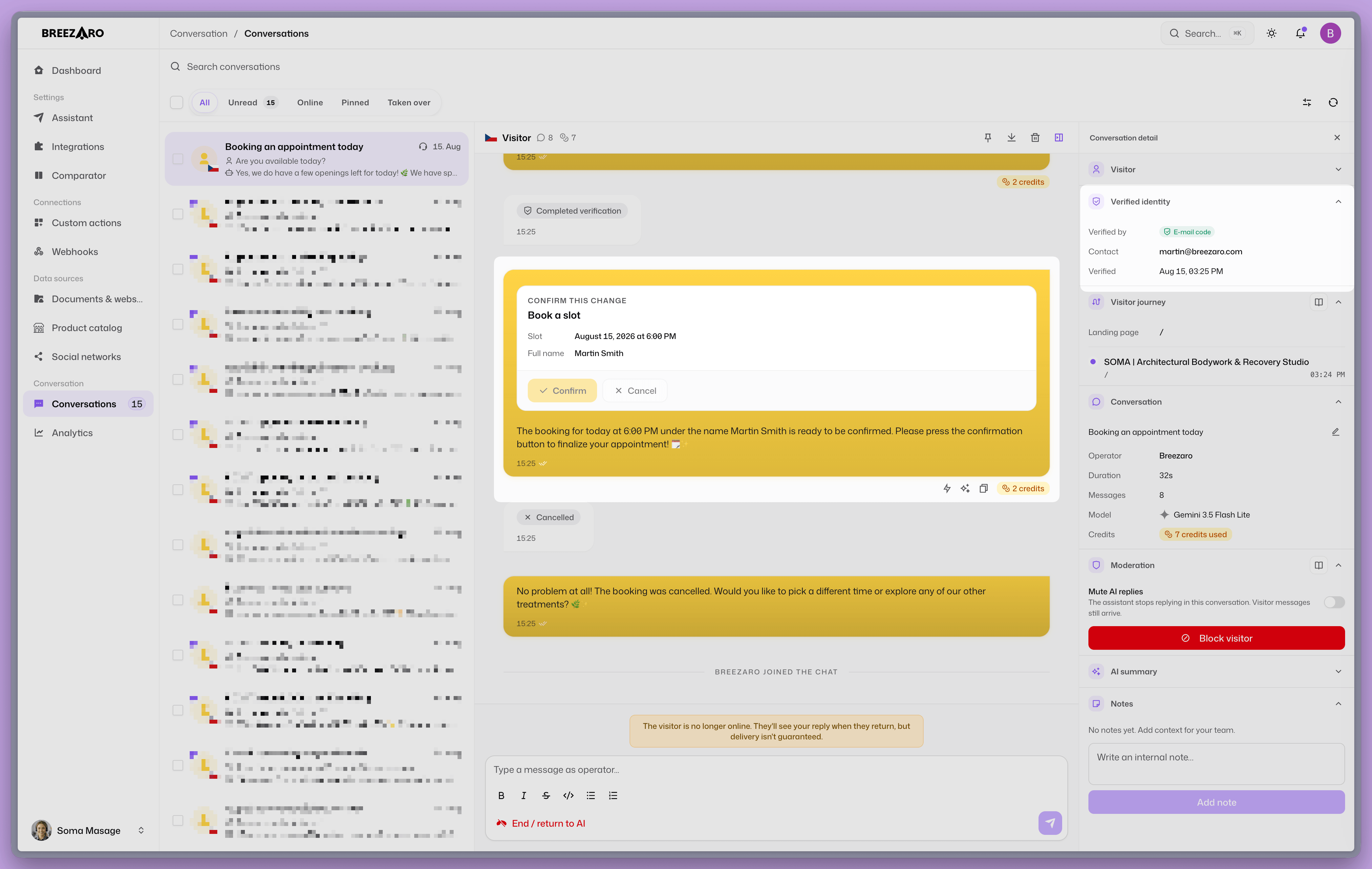
The difference between reading and writing is not a technical detail. It is a line the bot will not cross on its own.
Two records from two sides
While that plays out in the chat, webhooks push events out that you can wire to anything. You could use Make to write the rows into Google Sheets, but it could just as easily be your CRM, or a message in Slack.
Once the booking exists, two rows land in the spreadsheet from two different systems that know nothing about each other.
- Breezaro knows what happened in the conversation. Which action the bot called, with what values, whether it succeeded, and which conversation it belongs to.
- The booking system knows what is in the calendar. The booking reference, the exact start, and the attendee as it recorded them.
You will not find the booking reference on our side, because we never send your API's response in an event. It comes from the other side. Together you get proof that the assistant created the booking, and proof that the booking actually exists.
A customer asks about their order
A customer types into the chat asking where order 1042 is. The bot does not ask for a name, it asks for verification. A code arrives by email, the customer types it back, and no account gets created anywhere. Only then does the bot look into WooCommerce and return the status, the items and the total.
The customer never types the email address the order was placed with. The bot takes it from the verification, so it cannot be invented or guessed.
The point lands at the end. In the same conversation you ask about another order whose number you know but which belongs to somebody else. The bot will not release it, and will not even confirm that it exists. An order number is not a password. On a lot of shops it is treated exactly like one.
What gets written to the spreadsheet meanwhile
Webhooks push events out for this demonstration too.
Two rows land. One at the moment of verification, with the customer's address and a timestamp. One at the moment the bot fetched the order, with the action name and the number it asked about.
Two things there are worth underlining:
- Your API's response is never sent. The event carries what was looked up, not what was found. The contents of the order never leave Breezaro this way.
- A failed attempt is recorded too. That question about somebody else's order lands in the spreadsheet with a
failedstatus. Operationally that is more valuable than it sounds, because it is exactly what you want to see.
What to watch out for
- Custom order numbering. If a plugin shows customers a different number from the internal one, the action will search by the internal number and find nothing. Check that before you let the action loose on customers.
- Only an email address can be proven. The name is an ordinary input the customer types. A code sent by email proves an address and nothing else, and a name is not something that can be evidenced anyway.
- An action has ten seconds. Calling a service directly is no contest. If you put an automation scenario in between, the whole thing has to answer inside that limit.
- A webhook address is a password. Neither Make nor Zapier checks the signature, so that address is the only thing stopping anyone from posting you a forged row. Treat it accordingly and never put it on display.
- When nothing arrives, open Deliveries. The endpoint keeps a list with the response from the other side, which separates an undelivered event from a scenario that is rejecting the request. After twenty failures the endpoint disables itself.
- Compare times as times. When you pair the two rows up, expect each side to use its own offset from UTC.
How you set it up
You do not have to assemble either action by hand. The Custom actions section has ready templates that arrive prefilled, so you only fill in your shop or calendar address and an API key. The key is stored as a secret header that not even you will see again. In the last step you run a test against real data and tick the fields the bot is allowed to see.
For the webhook you add an endpoint, paste the address from your automation tool, and pick the events you want to receive. There is more detail in custom actions and in the worked example with a handover alert.
FAQ
Can the bot show somebody else's order? Not if you leave the verified-visitor requirement switched on. The rule compares the verified address with the address on the order, so knowing the number is not enough on its own.
Will the bot make a booking by itself? No. An action that writes always shows a summary with a confirmation first. Without the button press, nothing happens.
Does the webhook send the response from my system? No. The event carries the action name and the values it was called with, not what your API returned.
Do I need a developer? No. The templates and the wizard walk you through pasting an address and a key. Programming would only come in if you wanted to write an action from scratch.
A chatbot that reaches into your systems is useful exactly when it is also clear what it may do without asking and who it will show data to. Both demonstrations are about exactly that.
Related: Custom Actions · Webhooks · WooCommerce order status in chat.