Who can load your chat widget, and why it is worth restricting
The widget is one line of code and your appId is visible in every page. Allowed domains decide where it may load. Here is why an empty list means open, how domains are matched, and what happens when somebody pastes your widget on their own site.
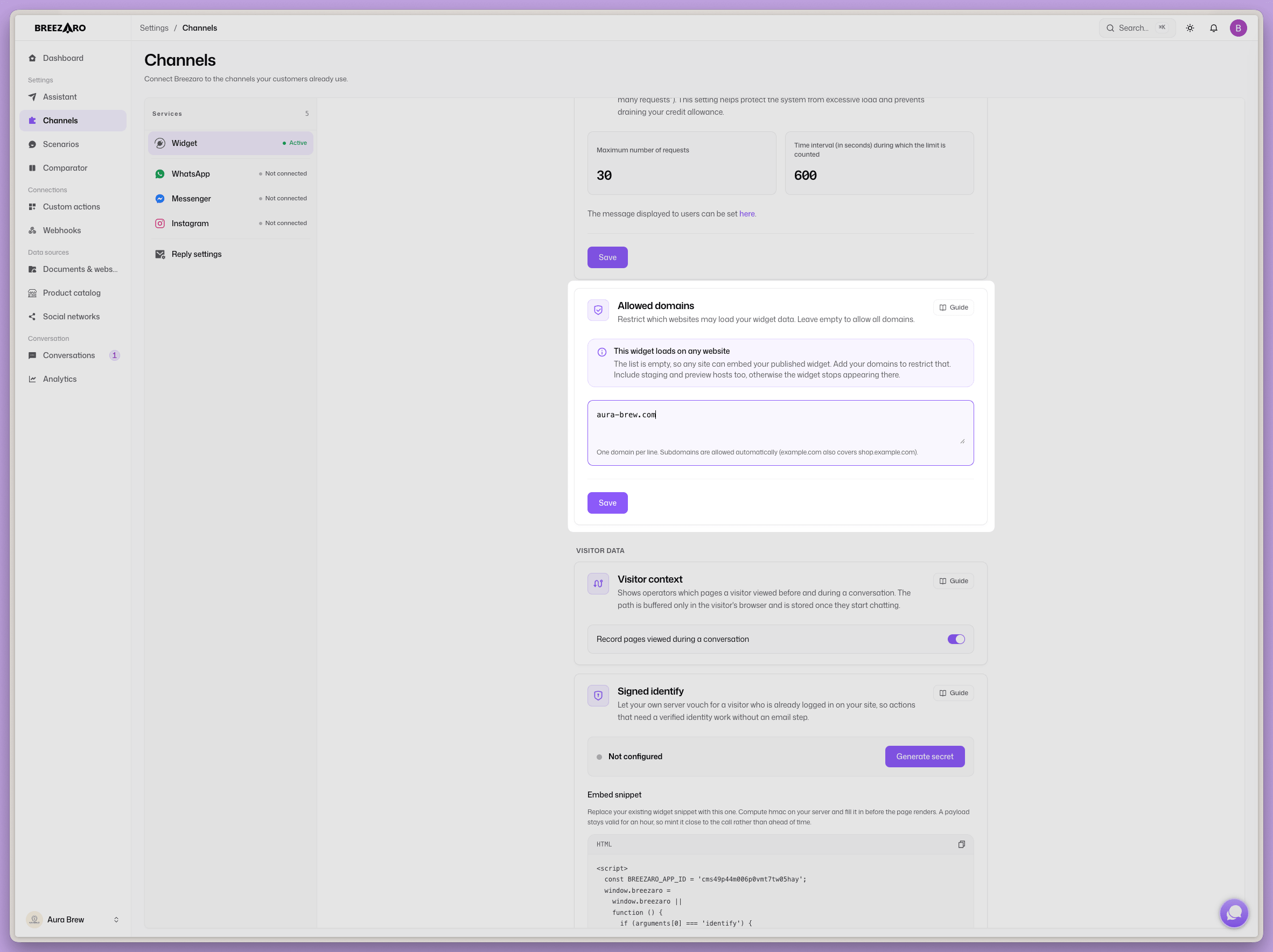
A chat widget goes live with one line of JavaScript, and that line carries your appId. The identifier is not a secret: anyone can open your page source and read it. Which raises a fair question, what stops another website from taking that same line and running your chatbot on their pages.
The answer is called allowed domains. It is worth knowing how they behave, because their default state surprises people.
An empty list means open, not closed
This is the most important sentence in the article. When the allowed-domains list is empty, the widget loads anywhere. It is not a lock waiting to be opened, it is a lock nobody closed.
There is a reason for it. Otherwise a new widget would work nowhere until somebody remembered to add a domain. The price of that convenience is that until you write something there, nothing stands in anyone's way.
Why care, if a stranger cannot steal anything from you? Credits, and keeping your data clean. Every bot reply draws on your monthly allowance, so a widget copied onto somebody else's website spends your money and fills your history with conversations that are not yours.
A new bot locks to the domain from signup
For newly created accounts the list now arrives prefilled with the website you gave at signup. A bot you create today starts locked to your site rather than open.
If your account is older, nobody filled it in retroactively. It is worth a look.
How domains are matched
The rules are deliberately simple, so there is little to get wrong:
- Subdomains come for free. Allow
yourdomain.comandwww.yourdomain.comandshop.yourdomain.compass too. You do not list them, and you do not have to think aboutwww. - Path and port do not matter. You can paste a full address with
https://and a subpage; only the hostname is stored. - Accented domains are fine. A domain with non-ASCII characters is converted to punycode, the form the browser actually sends, so the match still lands.
- Case does not matter.
What does not pass: a request that says nothing about where it came from. If your list is filled in and the request carries no origin header, the widget does not load.
What a foreign site gets
The refusal is immediate. The server returns 403, and the response is never cached. It does not stop at the widget script either: the same check guards the real-time chat connection, visitor event collection and proactive messages.
Take it for what it is, though: protection for an ordinary installation, not a security boundary. The chat has to stay reachable for a completely anonymous visitor, so the chat surface itself is deliberately public and can be embedded outside this path. Allowed domains reliably stop a snippet copied from your site from working on somebody else's. They will not stop somebody who is deliberately trying.
When the widget disappears, this is often why
Locking to the wrong domain used to fail unpleasantly: the widget simply never appeared, the response was a bare 403, and there was nothing anywhere. No record, no warning. From the site owner's side it looked like a malfunction.
Today every such refusal is written to the log, including which address it came from and which list it was matched against. Logging is capped at one line per bot and address per hour, so a single misconfigured site cannot bury the table. And the dashboard now points out a published bot whose list is empty.
So when your widget stops appearing after you move the site to a new domain, or switch to a new staging environment, this is the first place to look.
When to leave it empty, and when not to
An empty list has its place. If you are still trying the widget out, about to install it on several sites at once, or testing on throwaway staging addresses, the restriction is only in the way.
Once the bot is live and you are being charged for its replies, that changes. Add your domain, the subdomains come with it, and you are done. If you also run staging, add its domain as a second line.
How to set it
In the dashboard open Integrations and find the allowed-domains list in the widget section. Type a domain, save, and that is it. The check applies immediately, so after saving, confirm the widget still shows on your site.
For the widget's appearance see customize your chat widget, and for data handling see chatbots and GDPR.
FAQ
Is my appId secret? No. It sits in your page source, as with any other widget. That is exactly why access is not handled by hiding the identifier but by a list of domains.
Do I need to add www? No. Allowing a domain automatically allows all of its subdomains, www included.
What happens if a stranger installs my widget? With the list filled in, the widget load gets a 403 and it never appears on their site. With it empty, it works for them and the replies are billed to you. It is protection against a copied snippet, not against deliberate abuse.
Can I tell when something is blocked by mistake? Yes. Refused loads are logged along with the address they came from, so it can be traced.
Allowed domains are a five-minute setting that people usually discover only when something breaks. Add your domain right after you install, and it is off your mind.
Related: Customize your chat widget · Chatbots and GDPR.