Webhooks
Receive signed notifications about conversations and actions in your own systems.
What fires, and when
Breezaro can POST a signed JSON event to your endpoint whenever something happens in a conversation.
conversation.startedA new conversation begins, on the widget or a connected channel.message.createdA message is saved to a conversation, from the visitor, the assistant, or an operator.handover.requestedA conversation asks for a human for the first time, escalated by the assistant.handover.claimedAn operator takes over a conversation and joins it live. Pair it with handover.requested to measure how long visitors wait for a human.custom_action.executedA confirmed data-changing custom action finishes running in the web widget. Read-only actions fire custom_action.read instead, and an operator's own test call from the dashboard never fires either event. Data-changing actions run only in the web widget today, so this event never arrives from a connected channel.custom_action.readA read-only custom action finishes running, on the widget or a connected channel. Both this event and custom_action.executed carry the arguments the assistant called the action with, so you can see which customer or record was looked up. Neither carries your endpoint's response.visitor.verifiedA visitor's identity is verified for the first time in a conversation, by an emailed code, by a signed identify() call from your own page, or automatically on WhatsApp, where the channel has already verified the number. The event carries the contact details unmasked, so your CRM can use them, and it fires once per conversation: verifying the same visitor again sends nothing.form.submittedA visitor submits a form in website chat. Includes the published form reference and submitted answers. Only endpoints explicitly subscribed to form.submitted receive it; reopening or marking a response as processed does not create another event.endpoint.testA bare connectivity ping with no conversation and no event fields. Send samples only falls back to it when none of the events an endpoint subscribes to still exist in the catalog above, so in practice you should never receive one.
Set up an endpoint
Four steps from an empty list to a verified integration.
- Create an endpointIn the dashboard, open Webhooks under Settings and add an endpoint. The URL must be HTTPS; add a label if you plan to run more than one.
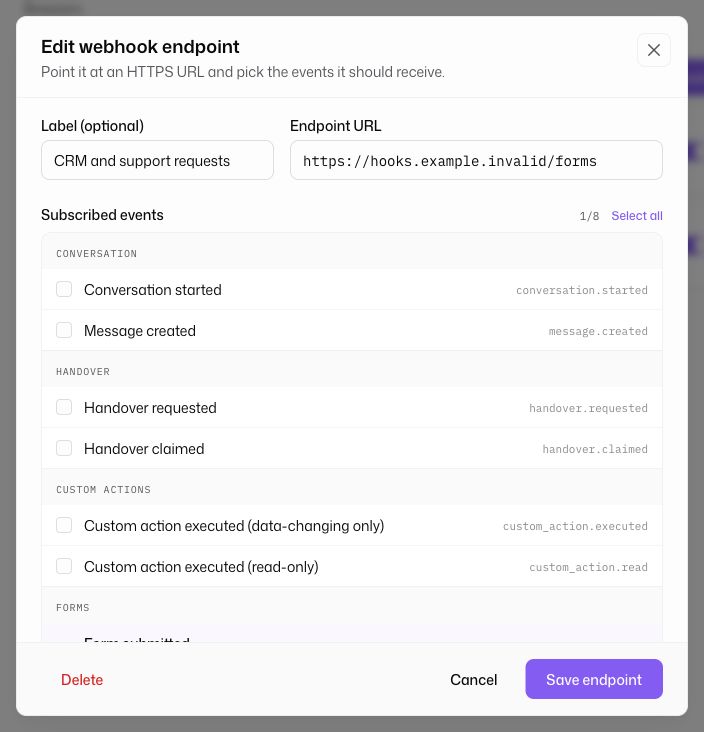
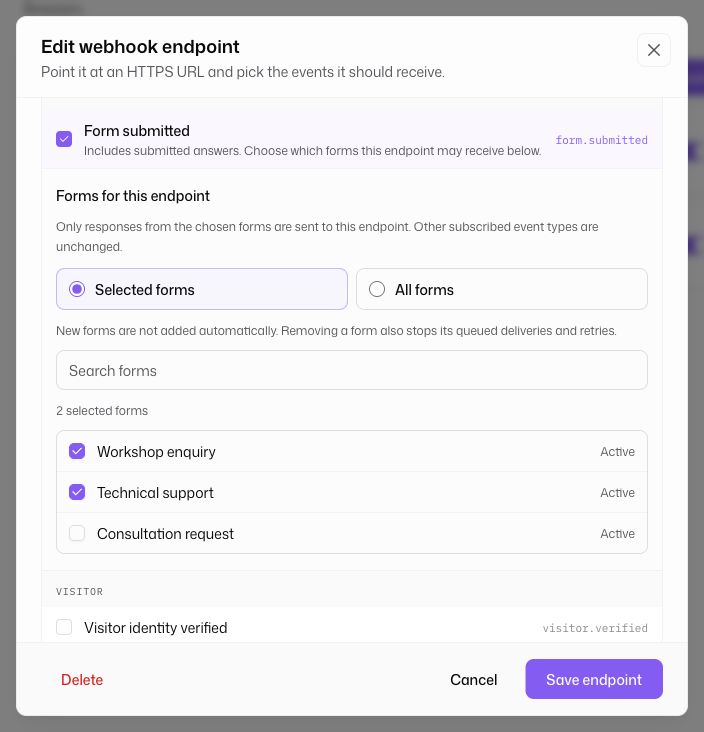
- Subscribe to eventsPick which event types from the catalog above should reach this endpoint. For Form submitted, choose Selected forms and check the forms to include, or explicitly choose All forms. All forms includes future forms for this assistant; Selected forms does not. You can change the selection later.
- Verify the signatureEvery delivery is signed. Check it before trusting the body, using the scheme under Verify a delivery below.
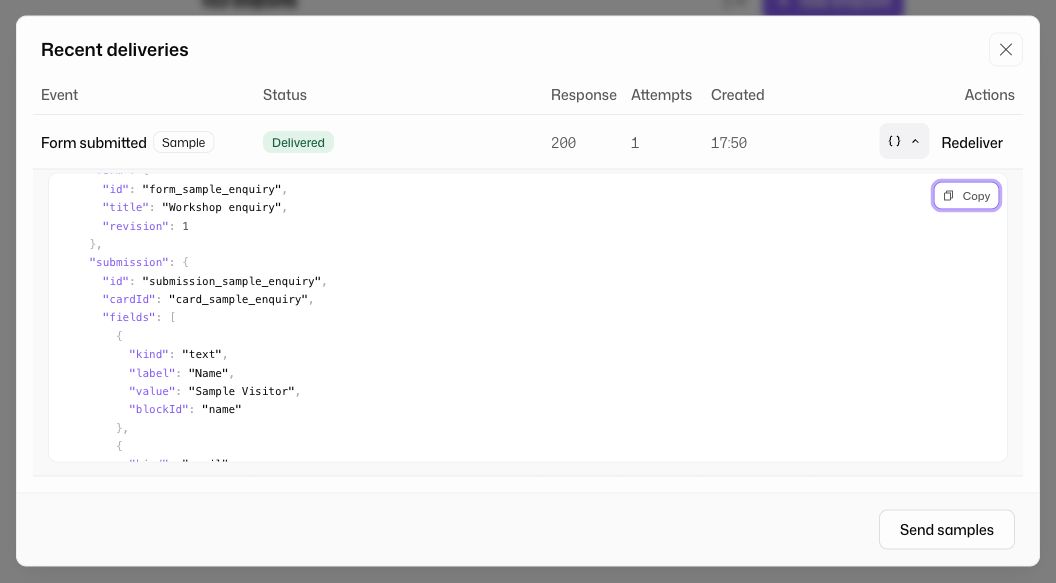
- Send a sampleSend samples on the endpoint fires one realistic sample of every event the endpoint subscribes to, through the full pipeline, queued and signed exactly like production traffic. Each sample carries test: true so your handler can tell it apart from the real thing.
Connect it to Zapier
Zapier can catch a webhook without you running a server, so an event can land in a spreadsheet, a Slack channel or your CRM in a few minutes.
- Create a Zap with a Catch Hook triggerIn Zapier, create a new Zap and pick Webhooks by Zapier as the trigger app, with the event Catch Hook. Zapier hands you a custom webhook URL. Copy it.
- Add the URL as an endpoint in BreezaroIn the dashboard, open Webhooks under Settings, add an endpoint and paste the Zapier URL into it. Subscribe it to the events this Zap should react to, keeping the list as narrow as the Zap actually needs, then save.
- Get a sample to mapZapier shows you no fields until it has caught a request. Leave the Zap’s test step open, press Send samples on the endpoint, then run Test trigger in Zapier. You get one sample per subscribed event without staging a real conversation first.
- Map the fields into your actionAdd the action step (Google Sheets, Slack, your CRM) and map the sampled fields into it. Zapier flattens the nested envelope, so the conversation id usually shows up under a name like data__conversation__id.
- Turn the Zap onPublish the Zap and every matching event runs it from then on. Watch the endpoint's Deliveries list in Breezaro for the first day: it shows the response code Zapier returned for each event, which is the quickest way to spot a Zap that is rejecting requests.
The fields worth mapping, and where they sit once Zapier has flattened the payload:
- id
- The event id. It stays the same across redeliveries, so map it into a lookup or dedupe step if running the Zap twice would do damage.
- type
- The event name, for example handover.requested. Useful when one endpoint is subscribed to several events and the Zap has to branch on them.
- createdAt
- When the event happened, as an ISO timestamp. Not when this particular delivery attempt was sent.
- data__conversation__id
- The conversation the event belongs to. Present on every event except endpoint.test.
- data__conversation__source
- Where the conversation is running: widget, whatsapp, messenger or instagram.
- data
- Everything else lives under data and differs per event type: data__message__text on message.created, data__requestedAt on handover.requested, data__action__name on custom_action.executed.
Make, n8n, Pipedream and similar tools work the same way: they hand you a URL that catches requests, and everything above applies to them unchanged, including the note about the signature.
Verify a delivery
Every request carries a signature, so you can confirm it came from Breezaro and was not altered in transit.
Three headers travel with every delivery: webhook-id (the event id, stable across redeliveries), webhook-timestamp (unix seconds at send time), and webhook-signature. Every request also sends content-type: application/json and user-agent: Breezaro-Webhooks/1.
webhook-signature is a version prefix and a signature joined by a comma: the literal v1, followed by the base64 digest. Take the part of your endpoint's secret after whsec_ and base64-decode it; that is your HMAC-SHA256 key. Sign the event id, a period, the timestamp, another period, and the raw request body, joined into one string in that exact order (see the pseudocode below), then base64-encode the digest. It should equal the part of the header after v1,.
signedContent = webhookId + '.' + webhookTimestamp + '.' + rawRequestBody
key           = base64Decode(secret.slice('whsec_'.length))
expected      = 'v1,' + base64Encode(hmacSha256(key, signedContent))

if (!constantTimeEqual(expected, webhookSignatureHeader)) reject('bad signature')
if (Math.abs(nowInSeconds() - Number(webhookTimestamp)) > 300) reject('stale timestamp')Payload shape
Every delivery POSTs one JSON envelope, whatever the event type.
id is the field to deduplicate on. type is one of the event names above. createdAt is when the event happened, not when this particular attempt was sent. apiVersion is a fixed string today and only changes on a breaking payload change. data carries the event's own fields, always alongside a conversation object with the conversation's id and source.
{
  "id": "evt_2b6f7e3a-9c9b-4a91-8ce1-7b6dcd6db8a2",
  "type": "conversation.started",
  "createdAt": "2026-07-29T14:03:11.482Z",
  "apiVersion": "2026-07-29",
  "data": {
    "conversation": {
      "id": "sample-conversation",
      "source": "widget"
    },
    "startedAt": "2026-07-29T14:03:11.482Z",
    "visitor": {
      "name": "Sample Visitor",
      "language": "en",
      "countryCode": "US",
      "deviceType": "desktop",
      "referrer": "https://www.google.com/"
    }
  }
}message.created labels each message's role as visitor, bot, or operator; internal system markers, such as an operator joining or leaving a conversation, are never sent as messages. For a channel bot reply, message.created means the reply was saved, not that the channel provider has delivered it to the visitor yet.
form identifies the offered form and its published revision. submission identifies the response and its submission time. Each entry in submission.fields contains blockId, kind, label and value. A choice value contains optionId and label; an empty optional answer is null. Use the immutable blockId to map fields to your system.
{
  "id": "evt_2b6f7e3a-9c9b-4a91-8ce1-7b6dcd6db8a2",
  "type": "form.submitted",
  "createdAt": "2026-07-29T14:03:11.482Z",
  "apiVersion": "2026-07-29",
  "data": {
    "conversation": {
      "id": "sample-conversation",
      "source": "widget"
    },
    "form": {
      "id": "form_sample_enquiry",
      "title": "Workshop enquiry",
      "revision": 1
    },
    "submission": {
      "id": "submission_sample_enquiry",
      "cardId": "card_sample_enquiry",
      "submittedAt": "2026-07-29T14:03:11.482Z",
      "fields": [
        {
          "blockId": "name",
          "kind": "text",
          "label": "Name",
          "value": "Sample Visitor"
        },
        {
          "blockId": "email",
          "kind": "email",
          "label": "Email",
          "value": "sample.visitor@example.com"
        },
        {
          "blockId": "request",
          "kind": "textarea",
          "label": "Your enquiry",
          "value": "Please send a workshop proposal for our team."
        }
      ]
    }
  }
}
Retries and auto-disable
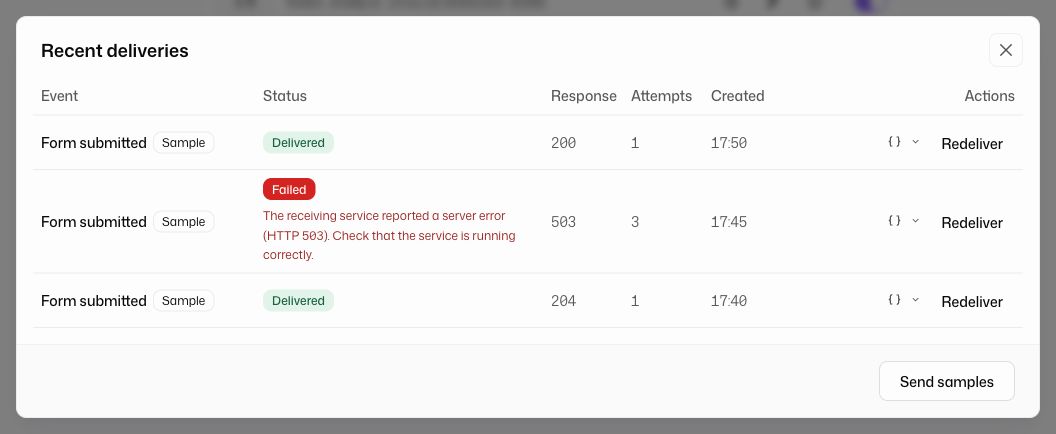
A failing endpoint is retried on a backoff schedule, then eventually disabled so a dead integration cannot pile up work forever.
Each event gets up to 8 delivery attempts spread over roughly 6 hours, with gaps of about 30 seconds, 2 minutes, 10 minutes, 30 minutes, 1 hour, 2 hours and 2 hours (each randomized by about ±20% so retries do not all land at the same moment).
Limits
Webhooks are deliberately constrained, the same way custom actions are.
- The number of endpoints per assistant depends on your plan; the dashboard shows how many you have used.
- Requires the Standard plan or higher (or an active trial). If your plan no longer qualifies, your endpoints are switched off automatically and you get a dashboard notification; after upgrading, re-enable them from the dashboard.
- Deliveries are free: sending or retrying a webhook never costs credits.
- Endpoint URLs must be HTTPS; requests to private or internal network addresses are blocked, the same as custom actions.
- Your endpoint has 10 seconds to answer with a 2xx status. The response content is ignored, but keep it under 2 MB; a larger response is treated as a failed delivery. A redirect counts as a failure, not a success.
- The dashboard keeps each endpoint's most recent deliveries for 30 days and their payload bodies for 7 days, then removes them.
- One endpoint can hold at most 1000 pending deliveries. While its backlog is that full, new events for that endpoint are dropped rather than queued, so fix or disable a failing endpoint instead of letting deliveries pile up.